Posts

blog parked

This blog is parked. I am trying out github pages and jekyll for a new format  -  https://meatsac.github.io/

Cleanup Oracle ADR trace files on Linux

Here's a nice loop cleanup the Oracle DB trace files on Linux with the adrci utility. #!/bin/bash #cleanup Automatic Diagnostic Repository (i.e trace files) #set oracle_home (have a script with your home info) source ~/OracleHomeScript.sh #list current repo size echo "" echo "##############size before############" du -shx /u01/app/oracle/diag echo "" echo "Listing diag directory homes..." echo "" ADR_HOMES=`adrci exec="show homes" |grep -v "ADR Homes:"` adrci exec="show homes" |grep -v "ADR Homes:" echo "" echo "" #Set-up loop for each home # for f in $ADR_HOMES do echo "purging $f older than 1 week" #Slow ADRCI Execution When Purging Files After Upgrade to 12.2 (Doc ID 2335738.1) adrci exec="set homepath $f; purge -age 10080 -nolog" done #list ADR repo size after echo "" echo "##############size after####...

Cleaning up Oracle Recycle Bin

It is a good idea to keep tabs on the recycle bin in your Oracle database, especially after PeopleSoft upgrades. This info is in the dba_recyclebin view. To check the size and number of objects select count(*), sum(space)/1024/1024 AS "Size in MB" from dba_recyclebin; To empty it purge dba_recyclebin

Monitoring Diskspace Usage on Linux

While I would always advocate to monitor OS metrics like disk space usage with an agent (i.e. Enterprise Manager/Zabbix/Prometheus) sometimes, that's not always an option. For a recent edge case I needed to drop in a crontab script and wanted something dynamic (no hard coding) and informative. Here's what I came up with that may be useful for others. The output will look something like this: Running low on space "/dev/sda1 (85%)" on server.domain.com as on Tue Jul  3 12:54:39 EDT 2018.  It is mounted at /u01. To find large directories in the mount use the disk usage command, i.e. - du -ax /u01 | sort -n -r | head -n 10     **This email was generated from a script run on server.domain.com**

PeopleSoft HCM and PS Query Performance

Recently during a PeopleSoft HCM upgrade to image 24, we noticed our PeopleSoft Query performance was very poor. Thanks to a tip from the psadmin.io podcast, we found a work around referenced in Oracle doc id  - Multiple PSQueries Having Performance Issues After 9.2 Upgrade (Doc ID 2146808.1). The short version of the doc id, is to open Application Designer and switch the PERALL_SEC_QRY and EMPLMT_SRCH_QRY views from using the Oracle Specific SQL, back to the default SQL. It seems in Oracle's efforts to improve the performance of these views for their Oracle DB customers, they may have made it worse depending on your data.

Which Java version is my WebLogic server running?

While reviewing an Oracle CPU, I was asked to make sure we are running the current version of Java with our WebLogic servers. This should be an easy task, but Oracle's PeopleSoft DPK loads many version of Java, so it is not easy to know which one is in use. A quick Google, and I found a way to check the path of any running process. (in this instance, we're running Linux) First find the PID for the process ps -ef | grep -i java | grep -i "weblogic domain"       2. Check the path of the process against the /proc/ information ls -l /proc/"PID"/exe An the result will show the path to your java home. If you're not sure the version in the java home, just go to the directory and run  ./java --version For PeopleSoft, if you ever need to change the JAVA_HOME path that your WebLogic domain will use. You just need to modify the file $PS_CFG_HOME/webserv/ bin/setEnv.sh. In this file, is an option to override the default JAVA_HOME.

PeopleSoft login error STR_PCMINVPORTAL: Invalid portal name EMPLOYEE in request

Image
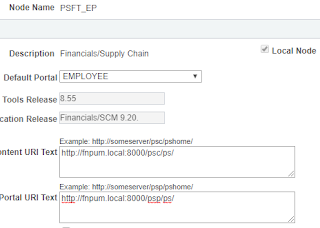
Recently I was alerted that after an upgrade, PeopleSoft SSO was no longer working. When users tried to access a trusted instance i.e. from FSCM->HCM, they were missing CSS on the page and it contained the error "STR_PCMINVPORTAL: Invalid portal name EMPLOYEE in request" on the page. This was puzzling, because the only info on Oracle support was related to the Interaction Hub aka Portal. After talking with support, it turns out the issue was related to a PeopleTools upgrade. In PT853 you did not need to set the urls on the node tabs. Now this is mandatory.  We also need to make 1 additional change to the webprofile because we are still using classic mode. Steps below: You must set the node url on the portal tab for local AND remote nodes .  This is as of PT854 and newer. Any node that shows up under PeopleTools ->Security Objects->Single Signon must have the Context URI Text and Portal URI Text values set to point at the URL's for the remote systems. You m...

Instant Reverse Proxy with Docker

Recently I have been using Docker to build out an Apache reverse proxy in development. The advantages of using Docker in this scenario are: Increased Security through isolation - Docker containers jail your application so that the main operating system hosting the container is protected. The containers are ephemeral and can be rebuilt in seconds. Some organizations rebuild their applications on a nightly basis. Fast Deployment - Once your docker file is setup you can deploy docker containers in seconds. This makes it very simple to graduate changes from development to production or rebuild infrastructure in DR scenario Cloud Friendly  - Docker containers are very portable. If suddenly your organization wants to move to cloud infrastructure or hosting providers, it is a relatively simple task to move these containers. Additionally, cloud companies like Amazon, Azure are heavily invested in Docker and already have many of the tools in place for organizations using Docker. ...

Linux Benchmark Script

This is a handy script I've used in the past to benchmark a Linux server.  It's helpful when you want to compare the performance between 2 systems. #!/bin/bash #basic benchmark script echo "Running basic benchmark against "$HOSTNAME cname=$(cat /proc/cpuinfo|grep name|head -1|awk '{ $1=$2=$3=""; print }') cores=$(cat /proc/cpuinfo|grep MHz|wc -l) freq=$(cat /proc/cpuinfo|grep MHz|head -1|awk '{ print $4 }') tram=$(free -m | awk 'NR==2'|awk '{ print $2 }') swap=$(free -m | awk 'NR==4'| awk '{ print $2 }') up=$(uptime|awk '{ $1=$2=$(NF-6)=$(NF-5)=$(NF-4)=$(NF-3)=$(NF-2)=$(NF-1)=$NF=""; print }') echo "Downloading Test File....." cache=$((wget --no-check-certificate -O /dev/null https://google.com/somelargetestfile) 2>&1 | tail -2 | head -1 | awk '{print $3 $4 }') echo "Testing I/O...." io=$( (dd if=/dev/zero of=test_$$ bs=64k count=16k conv=fdatasync ...

Applying Oracle CPU security patches for PeopleSoft

Every quarter (January, April, July, October) Oracle releases their CPU (Critical Patch Updates) for all Oracle products. For PeopleSoft there are quite a few different products that require individual patching. Assuming you are running the full Oracle Stack, within the Oracle CPU you should be looking for security patches to: • Weblogic • Tuxedo • PeopleTools (dot level patches not major release) • PeopleSoft Applications (while rare, security issues do come up in HCM,ELM,etc applications) • Oracle Database • Oracle Linux The most significant of these that requires patching is Weblogic. The easiest place to find this patches is on the Weblogic DocID page within My Oracle Support. Patch Set Update (PSU) Release Listing for Oracle WebLogic Server (WLS) (Doc ID 1470197.1) Once you have the patch downloaded, there is no need to unzip it, you are ready to start patching.This example will be done on a Linux based PUM appliance First set the variables to your java home...
Oracle Enterprise Manager notify when Recovery Area low

Image
I seem to be on the Oracle Enterprise manager kick lately, so why not one more post on it. Recently I hit the 85% mark on the Fast Recovery Area due to archive log bloat and did not see any alerts triggered in OEM. Well as I discovered, part of the reason for this is that according to MOS, "If using Fast Recovery Area (FRA) for the archive destination and the destination is set to USE_DB_RECOVERY_FILE_DEST, then the Archive Area % Used metric will not trigger anymore." Well that is annoying. However, I did find that the alert does trigger, but it is buried and doesn't show up on any main pages. To see it, go to the target database home page. Then navigate to Oracle Database->Monitoring->All Metrics . In the left pane you can scroll down to “ Recovery Area->Recovery Area Free Space ”.  There you will see your alert if active. When viewing the All Metrics page, click on the alerts icon to see active alerts. If you want to see it triggered just temporaril...

Oracle Enterprise Manager Last Backup timestamp is incorrect

Oracle Enterprise Manager 13 has a nice feature that shows the last backup timestamp on the home page of each target database. You can see this info directly in the SYSMAN.MGMT$HA_BACKUP table of the EM repository database. However , sometimes you may notice that this time stamp is older than the latest current backup . To add to the confusion if you navigate to "Availability->Backup&Recovery ->Backup Reports, you will see the true current time stamp which doesn't align with the time stamp shown on the target page. This is because the metric collection job that updates the SYSMAN.MGMT$HA_BACKUP table, only runs every 12 hours by default. At 12am/pm UTC. If you would like a particular target to update more frequently, you can use emcli . Example command shown below ./emcli modify_collection_schedule \ -targetType="oracle_database" \ -targetNames="MYDB" -collectionName="haconfig1_collection" \ -freqType="HOUR" -freqValue=...

Install Open SSH on Windows with Chocolatey

While Windows PowerShell does come with Remote PowerShell  it can be a bit cumbersome to work with. I find SSH to be far simpler in multi-OS environments. (If you're a pure Windows shop, consider sticking with Remote PowerShell). Setting up SSH is on Windows is now easier then ever with the Chocolatey repository. #To install Chocolatey - from elevated PowerShell Prompt iwr https://chocolatey.org/install.ps1 -UseBasicParsing | iex #To install openssh with ssh daemon choco install openssh -params '"/SSHServerFeature"' -y At this point you should be able to ssh from this machine and to this machine #To connect to another ssh server from the host with ssh installed ssh remoteserverip or hostname To connect to this Windows machine, use your preferred ssh client and login as a user with local admin on the machine. i.e. ssh adminstrator@windowsmachineip Now, optionally you can setup SSH key authentication. # To enable ssh keyauth Restart Windows #To ...

Managing Statistics on Oracle databases for PeopleSoft

Collecting statistics on Oracle databases for PeopleSoft is unique, due to the way PeopleSoft is designed to be "database agnostic". As result the built-in means to collect statistics on Oracle databases is not known to work well with PeopleSoft installations. Therefore, some custom settings are recommended. See Oracle documentation E-ORA Methods to Gather Statistics on PeopleSoft Oracle Databases (Doc ID 1345124.1). Basic Setup This is a high level walk through of statistics collection for PeopleSoft on Oracle database 11g+. First, disable the built in job called the ”auto optimizer stats collection”.  To disable it, run the SQL below:  (this assumes your schema is SYSADM) BEGIN DBMS_AUTO_TASK_ADMIN.DISABLE( client_name => 'auto optimizer stats collection', operation => NULL, window_name => NULL); END; / Next, we need to setup some database preferences. According to Oracle Doc ID 1345124.1, we should set our preferences as follows ...

Create a custom backup report with BI Publisher for Oracle Enterprise Manager/Cloud Control 13c

Image
Recently I was tasked to build out an OEM 13c instance to manage a few Oracle Database servers and their associated instances. As a part of the setup, I needed to generate a daily email report to confirm the backup status of all databases in the OEM inventory. Unfortunately, it seems Oracle has overlooked this in the default reports, so I had to create a custom report. Here's how this was accomplished. The EM Repository database keeps track of the last database backup timestamp for each database. This is shown on the home page for any database. We can use this information to create a daily report and confirm that each database has been backed up in the last 24 hours. Login the BI publisher site https://oemserver.yourdomain:9851/xmlpserver with your account or sysman. Near the top right corner click “catalog”. In the tree on the left create a new folder under “Shared Folders” called custom reports. Within the custom reports folder create a new folder called “custom d...

ADS compare permissions and PeopleSoft Update Manager

Just a simple post today. If you ever get the error " User does not have permission to perform Compare from File " when applying a PeopleSoft Update Manager (PUM) update, the user account you are using to apply the update in change assistant needs some new permissions added to it. It's almost guaranteed anyone doing their first PUM update will run into this. The PeopleSoft Enterprise Support blog has a great post covering this. https://community.oracle.com/community/support/support-blogs/peoplesoft-enterprise-support-blog/blog/2015/02/12/perplexing-problem-plaguing-pum-permissions

Converting Oracle Database ASM storage groups redundancy from HIGH to NORMAL

       Last year one of our DBA's came to us and said "We need to delete some databases, we're running out of space on the Exadata", to which we replied is there another option? It turns out there was. By default the Oracle ASM storage management software on Exadata uses HIGH redundancy which means triple mirroring or up to 3 disk failures. In development we don't necessarily need this level of protection so we investigated switching to NORMAL redundancy which means double mirroring or up to 2 disk failures and gives us some additional capacity. The catch..... you cannot directly convert. You need to create a new ASM storage group, add disks to it and then migrate the databases from the old to new storage group. Additionally, we had no available disks. However... there was a way to make this all happen. ASM allows you to live remove disks from existing disk groups as long as there is enough space on the other disks to handle the capacity, so we... Added s...

Backing up PeopleSoft Test Framework Objects

At my office, we refresh our PeopleSoft development databases quite regularly. The developers came to our team with a request to make sure we retain all PeopleSoft Test Framework objects in between refreshes. Additionally, it needs to be fully automated (no manual export/import). I did some digging and discovered that Application Designer command line allows you to create a project and insert specified definition types into the project. A read of the PeopleTools 8.54: Application Designer Developer's Guide  showed that the PTF objects numbers are: 104=Test Definitions 105=Test Framework Test Cases Armed with this info, I have put together simple Windows batch file that will create a project with all PTF tests and then export it to file. After the refresh job is complete, you can use the Application Designer cli to import the project back into the refreshed database. Script is in the "gist" below.

Run SQL against multiple Databases with PowerShell

Image
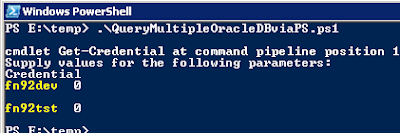
       Here is simple fun script I came up with some time ago when I needed to confirm that a user account was locked in all of our non-production databases. This one requires a Windows workstation with the Oracle client installed and PowerShell v3 or newer. It will go through the array of databases and return the SQL result for each database. This can be handy for comparing settings across multiple databases. Output looks something like this:

Rundeck and Job Automation with PeopleSoft

Image
If you are unfamiliar with  Rundeck , get ready to have your life as a System Admin made a bit easier. Rundeck allows you to take your scripts and put a web interface in front of them so you can easily set parameters and then run then with just a few mouse clicks. The only real limitation is what you can come up with in your preferred scripting language (bash, power shell, python, emcli, sqlplus... etc). Given the lack of admin tools delivered by Oracle for managing PeopleSoft, I find this software to be a must for any PeopleSoft Administrator. Installing the software is a breeze which can be done with either a package manager or simply by running the jar file with java. ( instructions on rundeck website ) Once you've done this just point your browser at http://localhost:4440 and sign in with admin/admin. Let's go through the setup. In this case I am going to install it on an Oracle Linux 7 VM with Campus Solutions PUM image#2 already installed. 1. Install RunDeck ...